
In the modern world of financial technologies, cryptocurrencies occupy a special place. One of the important tools for working with digital assets is the BingX crypto exchange app. The platform provides users with a wide range of capabilities for trading cryptocurrencies, including Bitcoin, Ethereum, and many others. The BingX app is designed with user convenience in mind and offers an intuitive interface, as well as a number of advanced features for experienced traders.
BingX emphasizes the security and transparency of its operations, making it a reliable choice for investors. The app supports not only spot trading but also futures, expanding its usability. An important feature of BingX is also the integration with social networks, allowing users to exchange strategies and follow the actions of successful traders. In today’s article, we will discuss the app’s functionality and how to download BingX to your phone.
Features and Highlights of the BingX Exchange App
The intuitive design of the BingX mobile software makes crypto trading accessible to all user categories—from beginners to professionals. The variety of crypto pairs and main digital assets, available both in the app and on the exchange’s web platform, allows investors to implement various trading strategies. The functionality of the BingX crypto exchange covers many tools necessary for modern digital currency market participants.
One of the notable features is the integration of social trading capabilities. Users can follow successful traders’ deals and copy their trades in real-time, which makes BingX especially attractive to beginners. Additionally, the app offers various market analysis tools, including charts, technical indicators, and trend analysis.
BingX ensures account security using modern encryption technologies and two-factor authentication, and offers customer support in multiple languages for maximum comfort. The platform provides wide opportunities: from spot and futures trading to obtaining loans secured by various assets. Users can invest in cryptocurrencies for steady earnings and perform buy-sell operations of tokens for rubles via the P2P service.
How to Download the BingX Exchange App on Your Phone and Install It in Russia
To start trading on the BingX crypto exchange using the mobile app, the first step is to download the BingX apk file and install it on your mobile phone. The installation process is quite simple and convenient.
- First, you need to visit the official BingX website. This is an important step because downloading the app from the official source guarantees safety and protection against potential threats. On the homepage, look for the download section (the download icon is located on the right side of the page).

- Choose your device’s operating system—Android or iPhone. After selecting, you will be redirected to the respective app store — Google Play Market or App Store. This ensures you download a version compatible with your device.

- In the app store on the BingX app page, find and click the “Install” button. Then, start the installation process, which usually takes a few minutes depending on your internet speed.
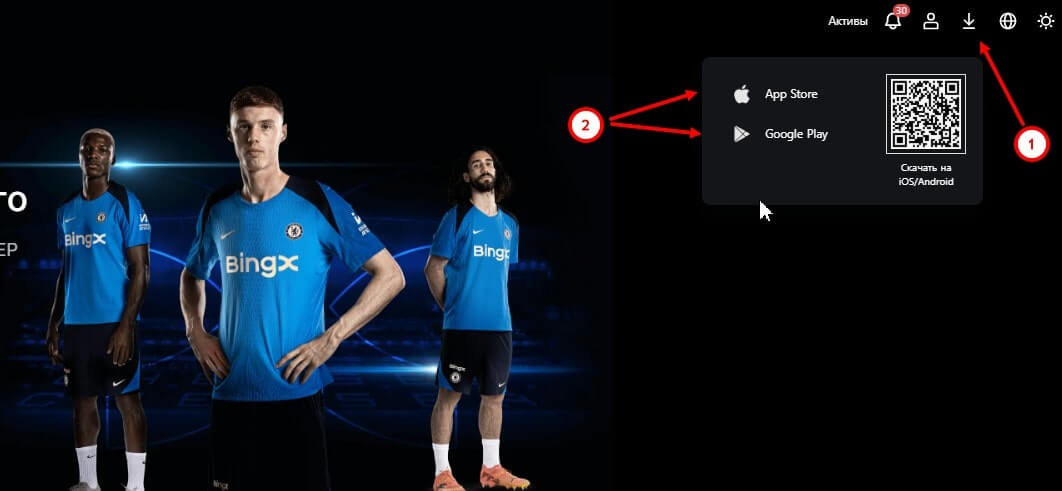
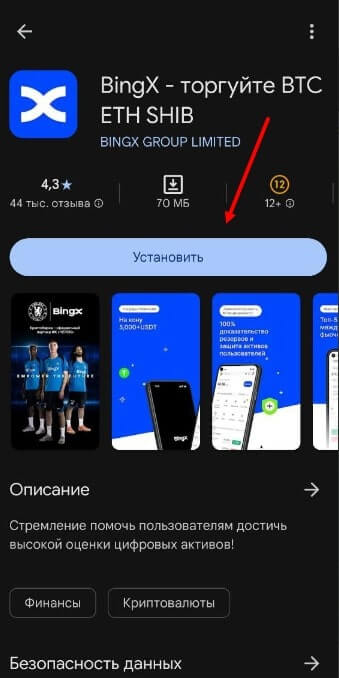
After the installation is complete, the app will appear on your device’s screen. You can now open it, register or log in to your account, and start using all the features and capabilities of BingX for cryptocurrency trading. Begin by exploring the interface to make the most of all the app’s features.
Tips and Recommendations for Using the App
When using the BingX crypto exchange app, it’s important to follow these recommendations for effective and safe operation.
- Always use two-factor authentication (2FA) to enhance account security. This will help protect your funds from unauthorized access.
- Regularly update the mobile app to utilize the latest security features and interface improvements. Also, keep your security system and antivirus software up to date.
- Study market trends and analytical reports provided by BingX for informed trading decisions. Don’t forget about stop-loss orders that can limit potential losses.
- Practice diversification of investments by not putting all funds into one cryptocurrency, which can help reduce risks. For example, 40% in BTC, 30% in ETH, and 30% in other altcoins.
- It’s also important to monitor news about cryptocurrencies, related projects, and technological updates, as the market is very dynamic and volatile.
Understanding the global economic situation can also play a key role in making informed trading decisions.
FAQ: Frequently Asked Questions
What security measures does BingX offer?
The platform uses advanced security technologies, including multi-factor authentication and data encryption, to protect user accounts and their cryptocurrency assets.
What methods are available for depositing and withdrawing funds on BingX?
Users can deposit and withdraw funds via various methods, including bank transfers, cards, cryptocurrencies to a dedicated wallet, and popular payment systems. Note that fiat deposits in rubles are not available; supported currencies include Australian Dollar, Swiss Franc, Japanese Yen, Euro, and Brazilian Real.
Are there trading fees on BingX?
Yes, BingX charges a small fee for each trade. The fee depends on the account type and trading volume. The basic fee on the spot market is 0.1%, for perpetual futures 0.02% for makers and 0.05% for takers, and 0.045% on standard futures. Withdrawal fees depend on the cryptocurrency and network used.
Can I trade on BingX from any country?
In most cases, yes, but it’s important to check if your country is not in the list of restrictions due to regulatory limitations.
How is customer support on BingX?
Round-the-clock customer support is available via various channels: phone, email, and chat. The platform provides full user support, resolving issues and answering queries at any time.
Can I download the BingX apk app on PC or laptop?
The software is available for free for Android and iOS users but is not available for download on a computer. For Windows 10, 11, Linux, and macOS, there is an online version with an intuitive interface in Russian.