
Starting your trading journey with a demo account is the classic method of learning trading used by the vast majority of market participants. Accounts of this type are excellent for testing new trading strategies. They are suitable for both beginners and experienced traders. This material covers all aspects of registration, usage, and the features offered by Quotex demo trade. Having such a powerful tool at their disposal, any market participant can develop and test any trading tactic in real time without financial risks.
For uninterrupted access to the platform, use a VPN.
Trade on a demo account with Quotex broker
Why specifically Quotex?
This article discusses demo trading in the context of binary options with the Quotex broker. The choice of asset and company was not random. “Binary options” are currently the most profitable market contracts. By accurately predicting the trend direction, you can significantly increase your initial deposit within a few minutes. The minimum profitability of these options when correctly choosing the position direction is 67%. In many stock assets, such a level of return can take years to achieve.
Quotex is one of the most user-friendly brokers. To open a demo account with Quotex, simply click the corresponding button on the company’s homepage. There is no need to enter personal data or verify it. Click on the “Open Demo Account” button — get instant results without registration.

The Quotex Demo Trade interface intuitively guides how to trade online. However, for newcomers to the “binary options” market, it may seem unfamiliar.
Trading window

The window is conditionally divided into three main logical parts:
- The left block — profile settings menu and access to trading signals and the internal Market.


The most interesting feature is the signals issued to clients as a guide for opening orders. This functionality is available even in demo mode, so potential clients can test the quality and reliability of these signals on their accounts.

Market — section for gaining additional advantages in trading. If you have the appropriate promo codes, the trading platform offers the ability to cancel losing trades, receive extra cashback, and many other benefits. This functionality is not available from the virtual account menu; to access these options, you need to register a real deposit. A separate article explains how to do this quickly and within minutes to get a ready-to-fund personal account on the official website.Read more here.
- The middle part — the visual trend display window. Located at the bottom left are buttons to customize the appearance of the trend.
 This icon block provides access to the following sections:
 - Simple graphical elements. Helps perform visual analysis of the trend by highlighting key levels, important trend areas, or leaving notes.
- Trend display interval settings. Allows choosing any period from 5 seconds to 4 hours. The minimum expiration period for binary options in Quotex is 1 minute.
- Trend display type. You can set the chart to display using Japanese candlesticks, Heiken Ashi, bars, or a simple line view.
- Technical indicators. These are tools highly rated by traders worldwide. Only the most necessary and objective indicators that can help make informed decisions when opening trading orders.

The right area is the order placement field. To open a position, you need to enter the mandatory parameters:
- expiration time
- investment amount
- direction of the position — higher or lower than the price at expiration. Next is the trade history window.


Making trades
Upon first entering the deposit, the trader is credited with 10,000 conditional units. Depending on the region, the balance may be expressed in rubles, hryvnias, dollars, or euros.
The current free balance is displayed above the trend window.

A position is opened after entering the mandatory parameters. The appearance of the order in the market is confirmed by the corresponding marker.
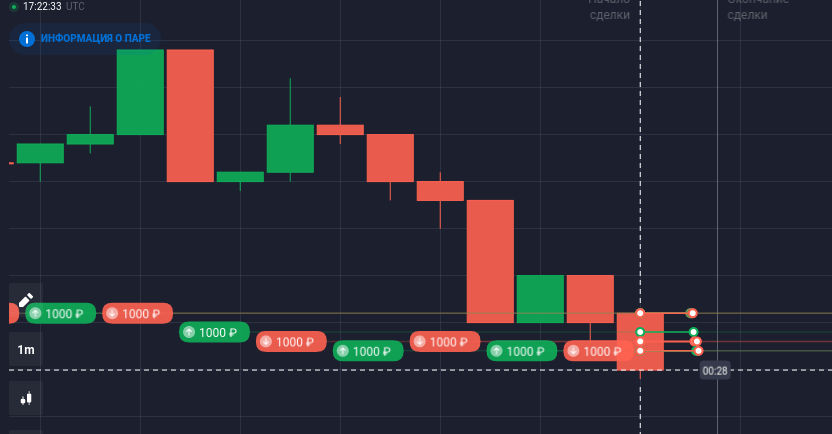
Depending on the type of open order, the marker may be green (for higher position) or red (for lower). The result of the option execution is reflected in the trading history section of the Quotex broker’s binary options window. This section can be collapsed or expanded by clicking the corresponding icon. The question of how much time is given for training in Quotex remains open — no time limit is set for owning a demo account.

After training — it’s time for action
Demo trading is undoubtedly useful. But only for mastering the basics of trading, no more. Often, just a few trading days are enough to fully learn all the features of the trading terminal. After that, you can confidently switch to opening a real account. The minimum deposit in the company is only $5. For comfortable market participation, it is recommended to increase this amount by depositing $50 or more. This allows you to fully play even the slightest market movements and earn profit. After quick registration of a real account, it’s enough to log into your personal account. As mentioned earlier, the Quotex interface is very concise, and the question of how to fund the account can be resolved in just a few clicks. Starting trading with a live deposit is the first step toward financial freedom in binary options markets.